
Configuration
MultiFlexi offers flexible configuration options ranging from server-level environment variables to granular per-application settings.
System Configuration
The core system behavior is controlled via environment variables, typically loaded from /etc/multiflexi/multiflexi.env.
Database Settings
DB_CONNECTION: Database driver (e.g.,
mysql,pgsql).DB_HOST: Database host address.
DB_PORT: Database port (default:
3306).DB_DATABASE: Database name.
DB_USERNAME: Database user name.
DB_PASSWORD: Database password.
Timezone
MULTIFLEXI_TIMEZONE: Timezone used for scheduling and displaying job/task times (e.g.,
Europe/Prague). Shared bymultiflexi-web,multiflexi-web5andmultiflexi-cli. If unset, it is autodetected from the server (PHP’sdate.timezoneini setting, then/etc/timezone, then the/etc/localtimesymlink, thentimedatectl), falling back toUTCif none of those resolve. Set this explicitly whenever the server’s detected timezone does not match the timezone your schedules are defined in — an undetected mismatch shows scheduled times and countdowns offset by the difference from UTC.
Kubernetes Executor
KUBECONFIG: Path to kubeconfig for the Kubernetes executor (default
~/.kube/configfor the daemon user).MULTIFLEXI_K8S_NAMESPACE: Override the target namespace for one-shot pods and Helm operations. When unset, uses the Helm chart namespace (default
multiflexi) or the cluster default. See Kubernetes Integration.
Docker Executor
MULTIFLEXI_DOCKER_NETWORK: Optional network for
docker run --network=.MULTIFLEXI_DOCKER_PULL: Set to
always(ortrue/1) to pull the application image before each job. See Docker Executor.
Security Options
ENCRYPTION_MASTER_KEY: Master key used to encrypt the per-purpose encryption keys stored in the
encryption_keystable (Critical: back this up — losing it makes all encrypted credential values unrecoverable). On package installs,multiflexi-common’sdebconfprompt sets this automatically (generated, or a value you supply — see the “Credential Encryption Key” step in Installation Guide; re-run withdpkg-reconfigure multiflexi-commonto change your choice). Otherwise set it manually, then runmultiflexi-cli encryption:initonce to generate thecredentialskey.MULTIFLEXI_MASTER_KEYis accepted as a backward-compatible alias. Not required for the web interface to function — it degrades gracefully (encryption/decryption simply unavailable) if unset.CSRF_PROTECTION_ENABLED: Enable Cross-Site Request Forgery protection (default:
true).BRUTE_FORCE_PROTECTION_ENABLED: Enable protection against brute force attacks (default:
true).BRUTE_FORCE_MAX_ATTEMPTS: Maximum number of failed attempts allowed (default:
5).BRUTE_FORCE_LOCKOUT_DURATION: Duration in seconds to lock out an IP after max attempts (default:
900).BRUTE_FORCE_TIME_WINDOW: Time window in seconds to count attempts (default:
300).BRUTE_FORCE_IP_LIMITING: Enable IP-based limiting for brute force protection (default:
true).SECURITY_LOGGING_ENABLED: Enable security audit logging (default:
true).DATA_ENCRYPTION_ENABLED: When
true(the default), redactable (password/secret-typed) Credential field values are required to be encrypted (AES-256-GCM) before being written tocredata.value— storing them fails closed ifencryption:inithas not been run yet. Set tofalseonly for local development/testing, where secret values are then stored as plaintext instead. Choosing “Do not encrypt credentials (development only)” inmultiflexi-common’s install-timedebconfprompt sets this automatically.RATE_LIMITING_ENABLED: Enable general rate limiting (default:
true).IP_WHITELIST_ENABLED: Enable IP whitelisting (default:
false).TWO_FACTOR_AUTH_ENABLED: Enable Two-Factor Authentication (default:
true).RBAC_ENABLED: Enable Role-Based Access Control (default:
true).
Session Management
SESSION_TIMEOUT: Session timeout in seconds (default:
3600).SESSION_REGENERATION_INTERVAL: Interval in seconds to regenerate session ID (default:
300).SESSION_STRICT_USER_AGENT: Enforce strict User-Agent checking for sessions (default:
true).SESSION_STRICT_IP_ADDRESS: Enforce strict IP address checking for sessions (default:
false).
API Limits
API_DEBUG: Enable API debug mode (default:
false).API_RATE_LIMITING_ENABLED: Enable API-specific rate limiting (default:
true).API_RATE_LIMIT_REQUESTS: Max API requests per window (default:
100).API_RATE_LIMIT_WINDOW: API rate limit window in seconds (default:
3600).
Email & Notifications
EMAIL_FROM: Default sender address for emails (default:
multiflexi@<SERVER_NAME>).SEND_INFO_TO: Email address to send informational notifications to (default:
false).
Logging & Telemetry
LOG_DIRECTORY: Directory for log files (default:
/var/log/multiflexi).ZABBIX_SERVER: Zabbix server address for logging to Zabbix.
ENABLE_GOOGLE_ANALYTICS: Enable Google Analytics (default:
false).LIVE_OUTPUT_SOCKET: WebSocket URI for live output (e.g.,
ws://localhost:8080).OTEL_ENABLED: Enable OpenTelemetry metrics export (default:
false). See OpenTelemetry Integration.OTEL_SERVICE_NAME: Service name reported to the OTLP collector, and the value shown under the
otel_scope_namelabel on every exported metric (default:multiflexi).OTEL_EXPORTER_OTLP_ENDPOINT: OTLP collector ingest endpoint (default:
http://localhost:4318). This is the metrics/traces ingest URL, distinct fromOTEL_DASHBOARD_URLbelow, which is a browsable UI link.OTEL_EXPORTER_OTLP_PROTOCOL: OTLP wire protocol,
http/jsonorhttp/protobuf(default:http/json).
Integrations
NODERED_ENABLED: Show the Node-RED link in the web interface (default:
false).NODERED_URL: Base URL of the Node-RED editor (e.g.,
http://localhost:1880). The navbar link appears only when bothNODERED_ENABLEDis true andNODERED_URLis set.NODERED_WEBHOOK_URL:
multiflexi-eventorNode-RED bridge endpoint. When set, the event processor forwards webhook changes and finished jobs to this Node-RED HTTP-in URL. Leave empty to disable the bridge. Configurable at install time viadpkg-reconfigure multiflexi-eventor.NODERED_TOKEN: Optional shared secret sent as the
X-MultiFlexi-Tokenheader with each Node-RED bridge request.NODERED_FORWARD_CHANGES: Forward incoming webhook changes in addition to finished jobs over the Node-RED bridge (default:
true).NODERED_CATALOG_URL:
multiflexi-eventorcatalog feed endpoint. When set, the event processor publishes all companies, enabled run-templates and credentials to thenode-red-contrib-multiflexicatalog node, which caches them for editor autosuggest on the generic nodes (RunTemplate / Company). Use a path distinct fromNODERED_WEBHOOK_URL. Leave empty to disable.NODERED_CATALOG_INTERVAL: How often (seconds) the catalog is republished; an unchanged catalog (content-hashed) is not resent (default:
300).MULTIFLEXI_URL: API root used by a MultiFlexi-hosted Node-RED process for the implicit connection (e.g.
http://127.0.0.1/multiflexi/api). Set on the Node-RED service, not only inmultiflexi.env.MULTIFLEXI_API_TOKEN: Bearer token for the Node-RED service account (
svc-nodered). Used by flow nodes forPOST /job/and related calls; editor login uses a separate per-user token frommultiflexi-auth.ZABBIX_URL: Base URL of the Zabbix web frontend (e.g.,
https://zabbix.example.com/zabbix). When set, a Zabbix entry is added to the Integrations menu. This is separate fromZABBIX_SERVER(see Logging & Telemetry), which is the trapper/proxy host used for sending metrics and is not necessarily reachable as a web frontend.OTEL_DASHBOARD_URL: Base URL of the observability dashboard (e.g.,
https://grafana.example.com). When set andOTEL_ENABLEDis true, an OpenTelemetry entry is added to the Integrations menu. This is separate fromOTEL_EXPORTER_OTLP_ENDPOINT(see Logging & Telemetry), which is the OTLP ingest endpoint and is not a browsable UI.
Application Configuration
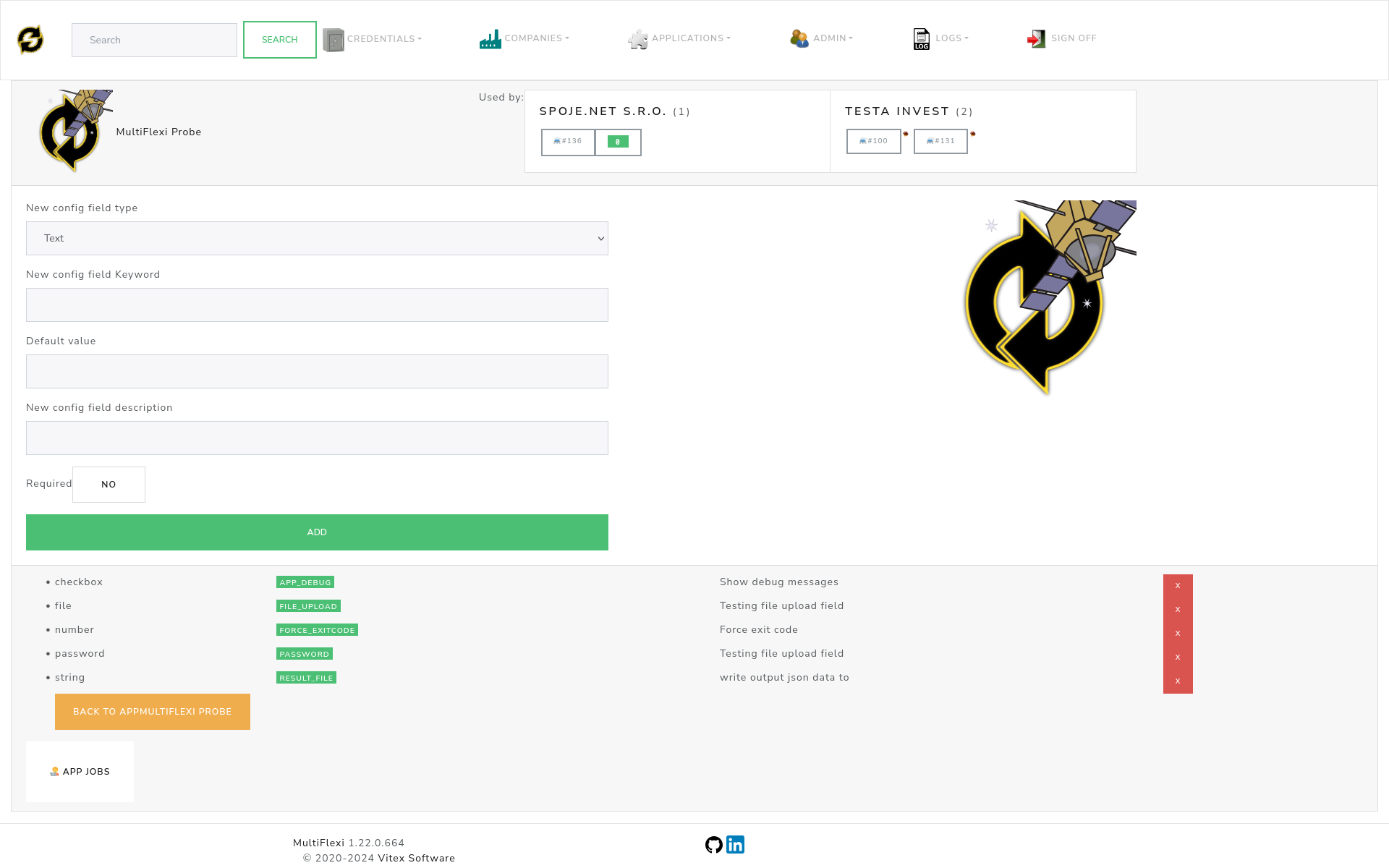
Each application installed in MultiFlexi defines its own specific configuration fields. These are managed through the web interface.
Configuration Field Types
MultiFlexi utilizes a typed configuration system to ensure valid data input:
String: Standard single-line input.
Text: Multi-line input.
Integer / Float: Numeric input.
Email: Validated email input.
URL: Validated URL input.
Password: Masked input for sensitive credentials.
Yes/No: Boolean toggle switch, consistently rendered wherever a boolean field is edited (the app’s config field definitions, a run-template’s configuration, ad-hoc job scheduling, the app launch and custom app config forms, and the activation wizard). Unchecking and saving a Yes/No field correctly persists the “No” value.
File path: Server-side file path input.
Set: Selection from a fixed set of values (currently rendered as plain text; a picker populated from a defined option list is planned).
GDPR & Compliance
MultiFlexi includes built-in tools to assist with GDPR compliance.
Security Audit: Logs all access and modification events.
Data Encryption: Encrypts sensitive fields at rest using AES-256.
Retention Policies: Configurable automated data cleanup schedules.
Anonymization: Tools to anonymize personal data after retention periods expire.
Refer to GDPR Compliance for a detailed implementation guide.
OpenTelemetry
For enterprise observability, MultiFlexi supports OpenTelemetry.
Service Name: Identifier for the MultiFlexi instance.
Collector Endpoint: URL of your OTLP collector.
Protocol: gRPC or HTTP.
See OpenTelemetry Integration for configuration details.
Logging
Logs are essential for monitoring and troubleshooting.
Locations:
File:
/var/log/multiflexi/multiflexi.log(Rotated daily).System: Syslog / Journald integration.
Database: Viewable via Web UI (latest events).
Zabbix: Real-time error trapping (if configured).
Tip
To watch logs in real-time via CLI:
tail -f /var/log/multiflexi/multiflexi.log